Tool Information Panel in the Tool Center Point (TCP)
What You See
The tool information dialog displays fields for Type, Name, and Manufacturer. The example shows Type set to Fiber Placement, Name as Addcomposites Oy, and Manufacturer as AFP-XS (Rev D).
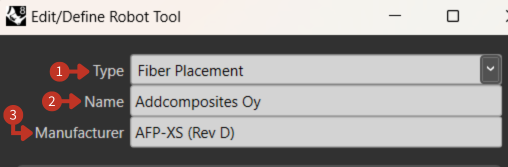
Tool Information configuration panel for defining tool specifications
What It Means
This panel is an extension of the TCP settings, providing additional detail for defining or editing a robot's tool.
Type
This dropdown menu allows you to select the type of tool you are configuring. "Fiber Placement" indicates that this particular tool is used for laying down fibers.
Name
The input field here allows you to give the tool a unique identifier. "Addcomposites Oy" seems to be a custom name, possibly indicating a specific orientation or position like '0 degrees on the y-axis' or a model name from the manufacturer.
Manufacturer
The "AFP-XS (Rev D)" entry specifies the make and model of the tool, providing essential information for referencing technical documentation or support for that specific tool.
Common Tool Types
- Fiber Placement
- Tape Laying
- Inspection
- Cutting
- Custom Tool