Robot Home Position Setting Interface
What You See
The interface segment labeled "Home Position" features a button titled "Set Current" alongside another button labeled "Go Home."
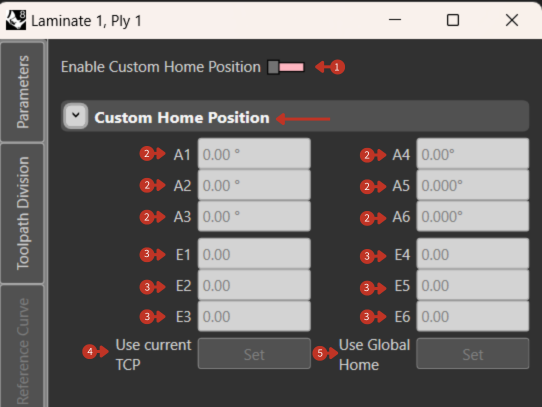
Robot home position management and navigation controls
What It Means
This is a crucial part of the robot control interface dedicated to establishing and utilizing a robot's home position—a preset, defined position of safety or start of operations.
Set Current
"Set Current" Button: When pressed, this button would set the robot's current position as the home position. This is typically used during the initial setup or if the home position needs to be redefined due to changes in the task or environment.
When to use:
- Initial system setup
- After workspace reconfiguration
- When establishing new default position
- After tool changes requiring new home
Go Home
"Go Home" Button: Commands the robot to move to its predefined home position. This is often used at the start of a new operation cycle or when the robot needs to be moved to a safe location.
Common uses:
- Start of shift positioning
- Before tool changes
- Emergency safe positioning
- End of program parking
- Maintenance preparation
Home Position Strategies
Standard Home Types
Production Home
- Optimized for cycle time
- Close to work area
- Minimal movement to start
Maintenance Home
- Maximum accessibility
- All joints accessible
- Tool change position
Storage Home
- Compact configuration
- Minimal footprint
- Protected position
Setting Procedures
-
Manual Setting
- Jog to desired position
- Verify clearances
- Press "Set Current"
- Test with "Go Home"
-
Program Setting
- Define in program code
- Set via teach pendant
- Import from configuration
-
Verification Steps
- Clear path from all positions
- No interference with fixtures
- Accessible for maintenance
- Quick emergency access
Safety Considerations
- Always move to home at reduced speed initially
- Verify path is clear before movement
- Set home position with tool attached
- Document home position values
- Include in startup procedures