Mounting Plate Location Configuration
What You See
The Mounting Plate Location w.r.t. Robot Flange interface contains a Define button for the Locating Plane and numerical input fields for position (X, Y, Z) in millimeters and orientation (Rx, Ry, Rz) in degrees.
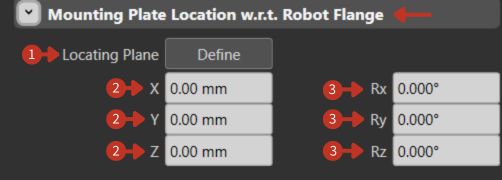
Mounting Plate Location configuration relative to Robot Flange
What It Means
This panel is for setting up the physical position and orientation of the mounting plate in relation to the robot's flange (the part where the tool attaches).
Locating Plane
The "Define" button next to this label is likely a command that allows users to set or define the reference plane for mounting the tool. The plane would serve as a basis for positioning the mounting plate accurately on the robot.
Position Settings
"X, Y, Z" input fields are for specifying the mounting plate's position relative to the robot flange. Since all values are zeroed, the mounting plate is currently set to coincide exactly with the robot flange's position in the robot's coordinate system.
Orientation Settings
"Rx, Ry, Rz" fields represent the rotational orientation of the mounting plate around the robot flange. With all values at 0.000°, the mounting plate is aligned with no rotation in relation to the flange's default orientation.
Configuration Tips
- Define the locating plane first before adjusting positions
- Small adjustments in position can significantly affect tool accuracy
- Document your mounting plate configurations for different tools