Advanced Parameters Interface
What You See
The interface section is titled "Advanced Parameters," presenting a series of adjustable settings: "Minimum Cut Length," "Runway Length," "Unpinch after," "Initial Feed Offset," "Tool Tilt," along with toggles for "Compensate previous laminate thickness" and "Go to home before new ply." There are also dropdown selections for "M.C.L Extension End" and "Mfg. Excess Extension End," both set to "Both Sides." Values are displayed next to sliders, indicating the current settings for each parameter.
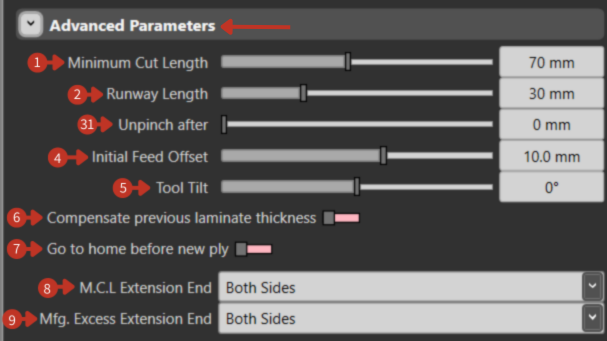
Advanced manufacturing parameters for precision layup control
What It Means
This segment of the software interface allows the user to fine-tune the advanced settings for a manufacturing process, likely related to composite material laying or cutting operations.
Cut Parameters
- "Minimum Cut Length" Slider: Adjusts the shortest length that the material can be cut to, set at 70 mm.
Process Parameters
-
"Runway Length" Slider: Defines the length of the area ahead of the material application point, set at 30 mm.
-
"Unpinch after" Slider: Specifies the point after which the material is no longer pinched or held tight, currently at 0 mm.
-
"Initial Feed Offset" Slider: Sets the starting position for material feeding relative to the workpiece, at 10.0 mm.
-
"Tool Tilt" Slider: Adjusts the angle of the tool relative to the workpiece, with a current angle of 0°.
Process Options
-
"Compensate previous laminate thickness" Toggle: When activated, adjusts the process to account for the thickness of previously laid laminates.
-
"Go to home before new ply" Toggle: If enabled, the equipment would return to a home or starting position before beginning the application of a new layer of material.
Extension Settings
-
"M.C.L Extension End" Dropdown: Allows selection of where the material cut length extension is applied; "Both Sides" suggests an equal extension at both ends of the material.
-
"Mfg. Excess Extension End" Dropdown: Similar to M.C.L, it determines where excess material is extended during manufacturing, also set to "Both Sides."
Parameter Guidelines
- Adjust minimum cut length based on material handling capabilities
- Set runway length for smooth acceleration/deceleration
- Use thickness compensation for multi-ply laminates
- Configure extensions based on trimming requirements