Mold Attachment to External Axes Configuration
What You See
An interface titled "Attach Mold to External Axes" with a dropdown menu labeled "Mold Connected to." The dropdown menu currently displays "Nothing" as the selected option, with other available options listed as "E1 Axis" and "E2 Axis."
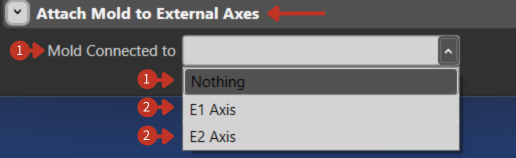
External axes attachment configuration for mold positioning
What It Means
This part of the software interface allows users to configure the association of a mold with external axes in a robotic or manufacturing setup.
Mold Connected to
The dropdown menu provides options for linking the mold to various external axes. The current selection of "Nothing" indicates that the mold is not currently attached to any external axis system.
External Axis Options
-
"E1 Axis": Would attach the mold to the first external axis, allowing the mold to move or rotate according to that axis's motion.
-
"E2 Axis": Would attach the mold to the second external axis for different motion capabilities.
Applications
Attaching molds to external axes enables:
- Dynamic mold positioning during layup
- Multi-sided access without manual repositioning
- Continuous rotation for cylindrical parts
- Synchronized motion with robot operations
- Improved accessibility for complex geometries
Configuration Tips
- Select appropriate axis based on required motion
- Ensure external axis can support mold weight
- Verify range of motion meets process needs
- Consider cable management for rotating molds
- Test synchronized motion before production