Base/User Plane Configuration
What You See
A section of the software interface is designated "Base/User Plane," which includes a toggle for activating the "Base Plane," a dropdown for selecting a "Base No," an input field for "Base Name," and numerical input fields for defining the base plane's spatial position (X, Y, Z) and orientation (Rx, Ry, Rz).
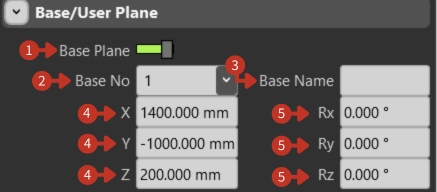
Base/User Plane configuration for coordinate system setup
What It Means
This panel is designed for configuring a reference plane within a robotic or simulation environment, allowing users to establish specific work areas or points of reference.
Base Plane Toggle
This switch enables the user to activate or deactivate the visualization or usage of the defined base plane within the simulation or programming environment.
Base Selection
"Base No": With the dropdown menu, users can select from multiple base plane configurations. This feature supports complex setups where multiple operational areas need to be defined and managed.
Base Naming
"Base Name": This field allows users to label the base plane, which is particularly useful for identifying and differentiating between various planes when working with multiple configurations.
Position Settings
"X, Y, Z": These inputs are for setting the precise location of the base plane in the workspace, allowing users to position the plane at specific coordinates relative to the robot or global origin.
Orientation Settings
"Rx, Ry, Rz": These inputs determine the orientation of the base plane in relation to the three-dimensional axes, facilitating accurate alignment within the environment.
Practical Applications
Base planes are commonly used for:
- Multi-Station Operations: Define different base planes for various workstations
- Part Alignment: Create reference planes that match part fixtures
- Coordinate Transformation: Simplify programming by working in local coordinates
- Batch Processing: Set up multiple identical work areas with different base planes
Configuration Tips
- Name your base planes descriptively (e.g., "Station_1", "Left_Fixture")
- Document the purpose and position of each base plane
- Use consistent orientation conventions across your base planes
- Test base plane positions with simple movements before complex operations