General Ply Parameters Interface
What You See
An interface titled "Laminate 1, Ply 1" presenting the "General Ply Parameters" section for editing detailed properties of a specific ply within a laminate structure. The panel offers sliders for adjusting various parameters such as gaps, manufacturing excess, overtravel distance, tool tilt angle, staggering percentage, and edge coverage. There are dropdown menus for "M.C.L Extension End" and "Mfg. Excess End," presumably allowing selections for the material cutoff length and manufacturing excess termination points. A vibrant display color indicator provides a visual cue to differentiate this ply in the workspace. Below these settings, a prominent "Replan" button suggests a functionality to recompute or update the ply's layup strategy based on the newly adjusted parameters. A toggle for "Show Planner Settings" implies the ability to display additional planning configurations related to the ply.
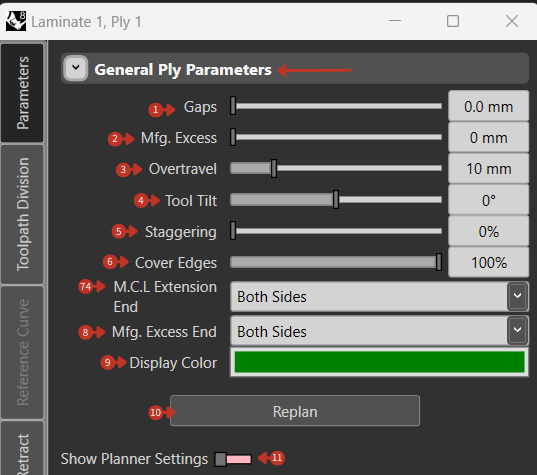
Detailed ply parameter configuration with manufacturing settings and planning controls
What It Means
This detailed ply configuration panel allows for precise adjustments to a ply's properties within the context of laminate fabrication.
Spacing and Coverage
-
"Gaps" refers to the spacing between individual tows or fibers, affecting the compaction and resin distribution within the ply.
-
"Cover Edges" controls the extent to which the ply overlaps or covers the mold edges, ensuring structural integrity and dimensional accuracy.
Manufacturing Allowances
-
"Mfg. Excess" allows defining the amount of extra material beyond the ply's intended boundaries, possibly for trimming or accounting for material distortion during processing.
-
"Overtravel" represents the distance the tool travels beyond the ply's edge, crucial for ensuring complete coverage and avoiding incomplete edges.
Process Control
-
"Tool Tilt" adjusts the angle of the application tool relative to the ply surface, which can impact the quality of fiber placement and overall laminate consolidation.
-
"Staggering" pertains to the offset of fibers or tows from one pass of the tool to the next, influencing the ply's drapability and mechanical properties.
Extension Control
- "M.C.L Extension End" and "Mfg. Excess End" selections indicate control over where additional material is included or removed at the ends of the ply, vital for material economy and process optimization.
Visualization
- The "Display Color" aids in visually segregating the ply in a multi-ply layout, enhancing the user's ability to track and identify specific plies within a complex stackup.
Planning Update
-
The "Replan" feature implies that after adjustments, the layup path or strategy can be recalculated to reflect the new parameters, maintaining accuracy and efficiency in the layup process.
-
The "Show Planner Settings" toggles reveal additional settings pertinent to the planning of the ply's layup sequence, possibly including order of layup, direction, and toolpath strategies.