Robot Speed Settings Interface
What You See
A user interface labeled "Robot Speed Settings" within the "Laminate 1, Ply 1" editing panel. It features a series of sliders and adjacent numerical values that represent different operational speeds for a robotic layup process. The parameters adjustable by the sliders are "Runway Speed," "Approach Speed," "Layup Speed," "Travel Speed," "Initial Feed Speed," along with "Homing Speed" as a percentage, and "Path Acceleration."
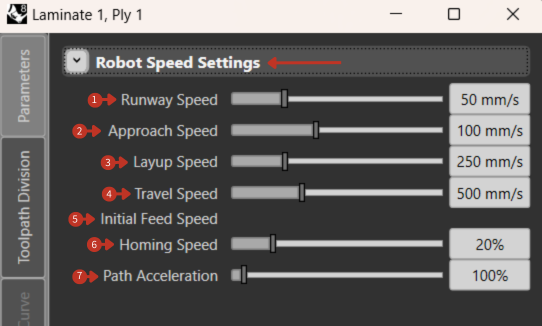
Comprehensive robot speed configuration for all operation phases
What It Means
This part of the interface is designed for precise control over the robot's motion speed during various stages of the layup process. Each speed setting caters to a specific phase of the operation.
Speed Parameters
-
"Runway Speed": 50 mm/s - How fast the robot moves to the starting point of the layup.
-
"Approach Speed": 100 mm/s - Sets the speed at which the robot moves towards the layup surface.
-
"Layup Speed": 250 mm/s - Determines how quickly the robot executes the actual layup of materials.
-
"Travel Speed": 500 mm/s - The speed for moving between different layup points.
-
"Initial Feed Speed": 100 mm/s - Influences the speed for the start of the material feeding process.
-
"Homing Speed": 20% - Expressed as a percentage, adjusts the return speed to a home position relative to maximum possible speed.
-
"Path Acceleration": 100% - Affects how quickly the robot can accelerate along its path, with 100% representing the maximum acceleration capability.
Speed Optimization Tips
For Quality
- Lower layup speeds (100-200 mm/s) for better compaction
- Reduced approach speeds for precise placement
- Moderate accelerations to minimize vibration
For Productivity
- Higher travel speeds (400-600 mm/s) between operations
- Increased runway speeds where quality isn't affected
- Maximum safe acceleration settings
Material-Specific Guidelines
Thermoset Prepregs:
- Layup: 150-300 mm/s
- Temperature dependent
Dry Fiber:
- Layup: 200-400 mm/s
- Higher speeds possible
Thermoplastic Tapes:
- Layup: 50-150 mm/s
- Requires heating coordination
Custom Home Position Setting
What You See
The interface section titled "Custom Home Position" from the "Laminate 1, Ply 1" edit settings includes input fields for robot joint positions (A1-A6) and external axes (E1-E6), with an option to "Enable Custom Home Position" and buttons for "Use current TCP" and "Use Global Home."
What It Means
This tool allows defining a custom home position specific to the current task:
- A1-A6 fields set angles for articulation joints
- E1-E6 fields configure external axes positions
- "Use current TCP" sets home to current tool position
- "Use Global Home" uses predefined global position