Return Motion Strategy Interface
What You See
The interface segment titled "Return Motion to Next Pass" presents a dropdown menu for "Return Strategy" with two selectable options: "Shortest Path (Linear)" and "Follow same toolpath (For complex molds)."
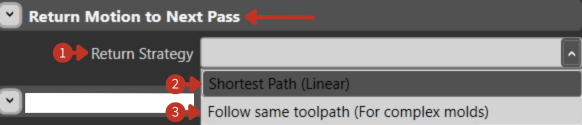
Inter-pass movement strategy selection for complex manufacturing operations
What It Means
This part of the software interface is dedicated to defining how a tool or machine will move after completing a pass during a manufacturing or machining process.
Return Strategy Options
"Return Strategy": This dropdown allows the user to select the method by which the tool returns to the starting point or moves to the next pass. The strategy chosen can affect the efficiency and time consumption of the overall process.
Available Strategies
Shortest Path (Linear)
This option suggests that the tool will take the most direct route back, which is usually the fastest option but may not be suitable for all scenarios, especially if there are obstacles or if the motion could cause a collision.
Best for:
- Simple, flat geometries
- Unobstructed workspaces
- Time-critical operations
- Low-complexity molds
Follow Same Toolpath (For Complex Molds)
This method would have the tool retrace its path, which can be essential for complex molds where the shortest path might not be possible due to the geometry of the workpiece. This option ensures the tool avoids any features of the mold that could interfere with a linear return path.
Best for:
- Complex 3D geometries
- Molds with protrusions or cavities
- Tight clearance situations
- Safety-critical applications
Selection Guidelines
Choose based on:
- Mold complexity
- Clearance requirements
- Cycle time constraints
- Safety considerations
- Material behavior (avoid disturbing laid material)