Approach/Retract Interface
What You See
A part of the "Laminate 1, Ply 1" editing interface with two sections: "Return Motion to Next Pass" and "Approach/Retract Settings." The first section has a dropdown menu titled "Return Strategy" with "Shortest Path (Linear)" selected. The second section includes sliders to adjust the "Approach Height" and "Approach Angle" as well as "Retract Height" and "Retract Angle," each accompanied by numerical input fields displaying values in millimeters and degrees.
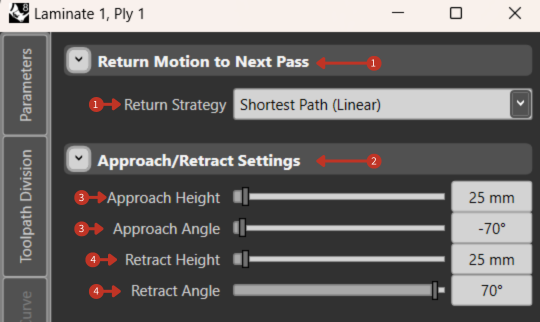
Tool approach and retraction parameter configuration interface
What It Means
This panel is essential for defining how the tooling equipment will navigate from the end of one pass to the start of the next during the layup process.
Return Motion to Next Pass
This setting allows the user to select the movement strategy the equipment will use after completing a pass. "Shortest Path (Linear)" implies that the equipment will take the most direct route possible, optimizing for speed and efficiency.
Approach Settings
"Approach Height" and "Approach Angle": These control the position and orientation of the tool as it moves towards the material, important for initiating the layup process correctly.
- Approach Height: 25 mm - vertical distance from tool to workpiece
- Approach Angle: -70° - angle of approach trajectory
Retract Settings
"Retract Height" and "Retract Angle": These determine the movement of the tool as it pulls away after completing a pass, essential for preventing any unwanted contact with the material or the workpiece.
- Retract Height: 25 mm - clearance height after completion
- Retract Angle: 70° - angle of departure from surface
Safety Considerations
- Ensure approach height clears any obstacles
- Set angles to avoid collisions with fixtures
- Consider material spring-back when setting retract height
- Test movements at reduced speed initially