Heater Settings Interface
What You See
The interface titled "Heater Control" includes a dropdown for "Heater Controller" set to "Addcomposites (IR or Laser)" and an "Intensity Mode" set to "Advanced." There are sliders for adjusting "Heater Intensity" and "First Layer Intensity" for various phases like "Approach," "Runway," "Pre-Cut Layup," "Post-Cut Layup," and "Overtravel," each with a percentage value beside them. Below are checkboxes for "Trigger Heater On" and "Trigger Heater Off" with options such as "Before Approach Path" and "After Cutting," plus fields for setting a delay in milliseconds.
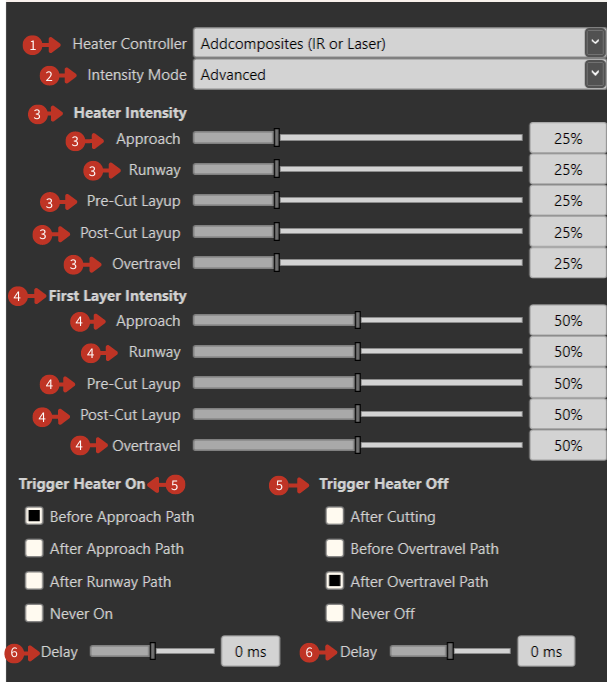
Comprehensive heater control configuration for composite layup operations
What It Means
This section of the software interface allows for precise adjustment of heating elements used in the process of manufacturing composite materials, such as during the layup process where heat is critical for material adhesion and curing.
Controller Configuration
-
"Heater Controller" Dropdown: Allows selection of the specific heating system in use, which could vary based on the heating method or the manufacturer.
-
"Intensity Mode" Dropdown: Provides options for setting the mode of intensity, with "Advanced" indicating more granular control over the heating levels.
Intensity Settings by Phase
"Heater Intensity" Sliders: Each slider adjusts the intensity of the heater for different stages of the layup process, ensuring the material is heated appropriately for optimal adherence and curing.
Process phases include:
- Approach: Heating during approach to surface
- Runway: Temperature during acceleration zone
- Pre-Cut Layup: Heat before cutting operation
- Post-Cut Layup: Heat after cutting operation
- Overtravel: Temperature during overtravel distance
First Layer Considerations
"First Layer Intensity" Sliders: Similar to the heater intensity, these settings specifically adjust the heat for the initial layer, which may require different parameters to establish a strong base for subsequent layers.
Trigger Control
-
"Trigger Heater On" Checkboxes: Offer control over when the heater activates during the process, with the ability to set these triggers based on the stage of the layup operation.
-
"Trigger Heater Off" Checkboxes: Define when heating should stop.
-
"Delay" Fields: These allow for timing adjustments, adding a delay before the heater turns on or off, ensuring precise control over the heating in relation to the tool's position and activity.
Temperature Guidelines
IR Heating
- Thermosets: 40-80°C surface temperature
- Thermoplastics: 200-400°C depending on material
- Dry fiber: No heating required
Laser Heating
- More precise control possible
- Higher power density
- Faster response times
- Narrower heat affected zone
Process Optimization
- Start with manufacturer recommended settings
- Adjust based on layup speed
- Consider ambient temperature effects
- Monitor actual surface temperatures
- Document successful parameter sets